tweetindex
ID

The SamurAI ✓

@samuraipreneur · europe · joined 20 Jan 2023

using ai to scale and to get more done in less time this stuff is still early, take advantage of that (and thank me later) samuraipreneur@gmail.com

47 714Followers
794Following
67 828Posts total
1.4MViews on collected posts

Postingan terbaru

ngl.. i'd watch more ads if they looked like the one on the right. and it's literally an ad for underwear. i probably wouldn’t even have thought about making a Pixar-style ad for it. and anyone can do this with ai now: i used Mark agent (from Arcads): give it your website ht
0:20
5.4K views · 15 likes · 0 reposts · 3 replies Open on X →
3D ads are crushing it on Meta Introducing Animation Studio Put your product URL, create a Claymation Ads Live today on https://t.co/Qn1gzWB65i https://t.co/YgJdxytDyw
0:50
65.9K views · 103 likes · 9 reposts · 30 replies Open on X →
is this for real 1.5K views · 0 likes · 0 reposts · 0 replies Open on X →
damn.. full-duplex voice in the API it listens and speaks at the same time and you can interrupt it. $0.05/min sounds like a steal 1.5K views · 0 likes · 0 reposts · 0 replies Open on X →
okey... these look like someone's camera roll, not an ai demo. > messy rooms > harsh flash > no more plastic skins GPT Image 2.5 just landed on Arcads with Sunburst + Flare. 2.0 vs 2.5 below. (look carefully at the faces): https://t.co/Su4b6Xeft5
0:10
4.7K views · 12 likes · 1 reposts · 3 replies Open on X →
@samuraipreneur 6 months, $300k and 5 devs?! Bruh if you are paying that to build CoachFlow you have zero idea what you're talking about. 😂 The "prayer that nothing breaks" is far more suited to coding with AI than experienced devs. 5.4K views · 73 likes · 0 reposts · 1 replies Open on X →
That's a wrap🍹 Hope you enjoyed it. Find daily AI content → @samuraipreneur 🥷 24.2K views · 29 likes · 0 reposts · 7 replies Open on X →
you don’t need a big team to build something personal + powerful. you just need: - one clear idea - https://t.co/dZUp9LVRDU - a tight scope - and a few AI tools to do the heavy lifting CoachFlow is proof. just build better. 17.1K views · 30 likes · 1 reposts · 1 replies Open on X →
9. test + ship once the app flows, just: - connect to Netlify (for hosting) - add a manifest for PWA install - share the link and start collecting feedback no App Store, no approval wait. https://t.co/Bas7dpPRY2
0:31
18K views · 37 likes · 3 reposts · 2 replies Open on X →
8. use Cursor to make edits in Cursor, you can: - refactor screens in seconds - add components with prompts - test new logic live - generate database schema instantly 18.2K views · 33 likes · 1 reposts · 2 replies Open on X →
7. backend powered by Supabase connect your frontend to real data with Supabase. you get: - email auth - journaling + habit database - AI prompts storage - file uploads (for voice-to-text reflections) zero DevOps. everything just works. https://t.co/mx9VBR9ZLY
0:19
19.7K views · 36 likes · 1 reposts · 1 replies Open on X →
6. build the frontend in Lovable https://t.co/dZUp9LVRDU makes it easy to bring your UI to life—without writing boilerplate. here you can: - import GPT layouts - create interactions + flow logic - preview how the app feels in hours, you get a working PWA, not just mockups. ht
0:45
21K views · 35 likes · 1 reposts · 1 replies Open on X →
5. choose the vibe we went with a modern glassmorph style and bright gradients: 🔹 glowing buttons 🔹 soft cards 🔹 vibrant colors (think cosmic bloom, vaporwave, arctic aurora) this makes the experience feel alive, not another boring productivity app. https://t.co/y7Ljnj3ST5
0:16
22.4K views · 34 likes · 1 reposts · 3 replies Open on X →
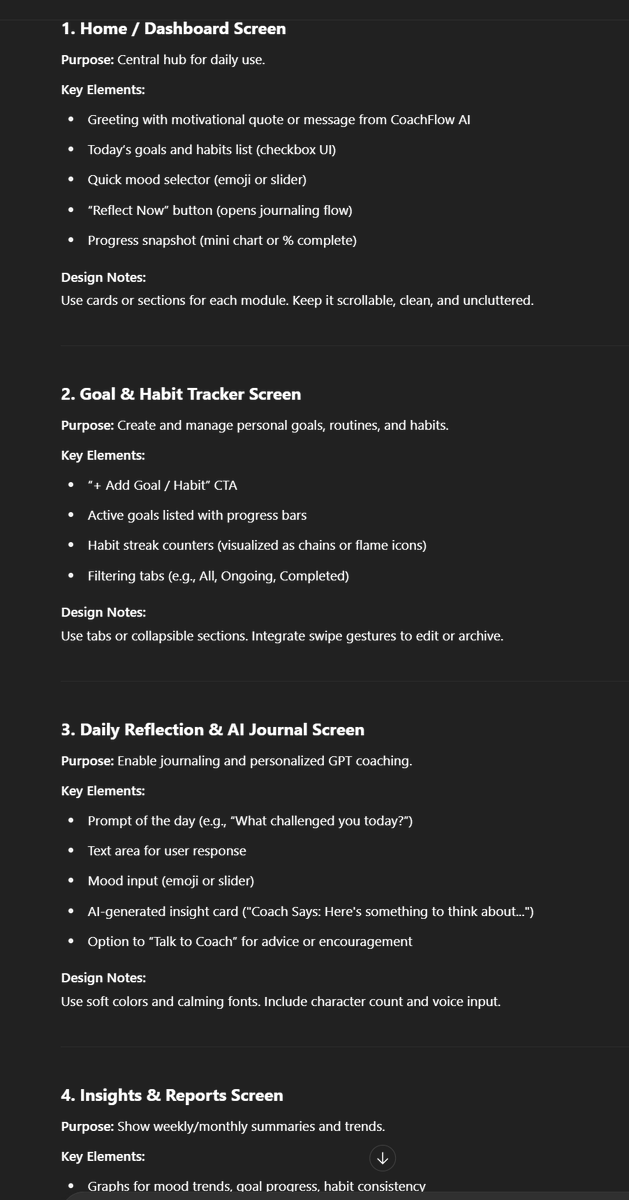
4. define the UI with GPT get ChatGPT to describe each screen layout. ask it to include: - components - user actions - nav structure - bonus details like mood sliders or coach tone toggles this becomes your blueprint for dev + design. (prompt in ALT) https://t.co/3gTeKAaRLk
I’m building a personal AI-powered coaching app called CoachFlow. It helps users set goals, track habits, reflect daily, and get insights each week.  Can you define 5 key screens for this app as part of the MVP?  For each screen, include: – a short purpose description – all major components (buttons, inputs, charts, etc.) – what actions the user can take – the nav structure – any useful extra UI elements (like mood sliders, habit streaks, or coach tone options)  The goal is to use this as a UI blueprint before starting design or dev."
24.3K views · 37 likes · 2 reposts · 1 replies Open on X →
3. pick your 5 must-have screens don’t overbuild. CoachFlow’s MVP only needs: - home dashboard - goal + habit tracker - daily reflection journal - weekly insights - settings + personalization less = faster shipping. https://t.co/yOszBIvC38
29.5K views · 40 likes · 0 reposts · 1 replies Open on X →
2. map the experience now break down how people will use it: - set goals - track habits - write reflections - get insights + motivation this is your user journey. keep it simple. focus on what really matters. 31.2K views · 43 likes · 1 reposts · 1 replies Open on X →
1. start with the vision before opening any tool, get 3 things clear: - who’s it for? - what problem does it solve? - what makes it feel magic? I use ChatGPT for all this for CoachFlow, it’s an AI coach that helps you stay on track with goals, reflect daily, grow consistently
0:29
35.9K views · 68 likes · 2 reposts · 1 replies Open on X →
I'll be using https://t.co/G1zOY8QxUU as the main engine for this workflow. Lovable’s new AI agents handled UI logic, interactions, and flow like a real senior dev—no boilerplate, just production-ready screens. 40.8K views · 82 likes · 3 reposts · 1 replies Open on X →
3 months ago, building an app required: - 6 months of development - $300K budget - Team of 5 devs - Prayer that nothing breaks Yesterday, I created and deployed CoachFlow in 22 minutes. Workflow: ChatGPT - Lovable - Supabase - Cursor step-by-step how: 1M views · 5.8K likes · 370 reposts · 144 replies Open on X →

Dibandingkan akun berukuran sama

5 postingan dari 90 hari terakhir, dibandingkan dengan rentang 10K–100K pengikut. tampil luas, tetapi sedikit penonton yang merespons.

Median tayangan4 694akun ini924median untuk 10K–100K
Jangkauan, %9.84%akun ini3.62%median untuk 10K–100K
Interaksi, %0.21%akun ini1.52%median untuk 10K–100K
MetrikAkun iniMedian untuk 10K–100KRasio
Median tayangan per postingan4 6949245.08×
Jangkauan (tayangan ÷ pengikut)9.84%3.62%2.72×
Tingkat interaksi0.21%1.52%0.14×

Akun lain pada rentang ini →   Bandingkan dengan akun lain →   Bagaimana tolok ukur ini disusun →

Growth & engagement

How the posts we collected actually performed: views and reaction rate post by post, what the audience did with them, and where the follower count goes.

Views per post

24.3K23 Jul
22.4K
21K
19.7K
18.2K
18K
17.1K
24.2K
5.4K24 Jul
4.7K10 Sep
1.5K
1.5K11 Sep
65.9K
5.4K

Last 14 collected posts, oldest on the left. The scale is logarithmic: one post can outrun the rest a hundred times over.

Engagement rate per post

0.16%23 Jul
0.17%
0.18%
0.19%
0.20%
0.23%
0.19%
0.15%
1.36%24 Jul
0.34%10 Sep
0.00%
0.00%11 Sep
0.22%
0.34%

Reactions — likes, reposts, replies and quotes — divided by views. Median for 10K–100K accounts is 1.52%.

What the audience does

Likes29.5%6 504 in total
Reposts1.8%396 in total
Replies0.9%203 in total
Bookmarks67.8%14 962 in total

Share of every reaction we collected for this account. Replies mean argument, reposts mean endorsement, bookmarks mean the post was worth keeping.

The follower curve appears once this account has two daily snapshots — we take one a day, and this one is on its first.

Akun serupa