tweetindex
TH

Utkarsh Sharma ✓

@techxutkarsh · Canada · joined 29 Aug 2023

Sharing insights on AI, Tech, No-Code & Online Business | Daily AI tools, prompts, guides & news | For collaborations ✉️ us558741@gmail.com

19 993Followers
394Following
6 528Posts total
12.8MViews on collected posts

โพสต์ล่าสุด

This is what makes open AI models so interesting. Instead of waiting for Apple Intelligence to support everything, you can build your own visual assistant with Shortcuts + OpenRouter + Ling 3.0 Flash VL. Snap a photo, ask what’s in it, and get useful answers in seconds. Pretty 261 views · 3 likes · 0 reposts · 0 replies Open on X →
The part that stands out to me is how little you need to think about the actual workflow. Give @Pexoai_offical a product URL, explain what you want in plain English, review the result, and keep refining it through conversation. That makes AI video creation feel much more like 231 views · 2 likes · 0 reposts · 0 replies Open on X →
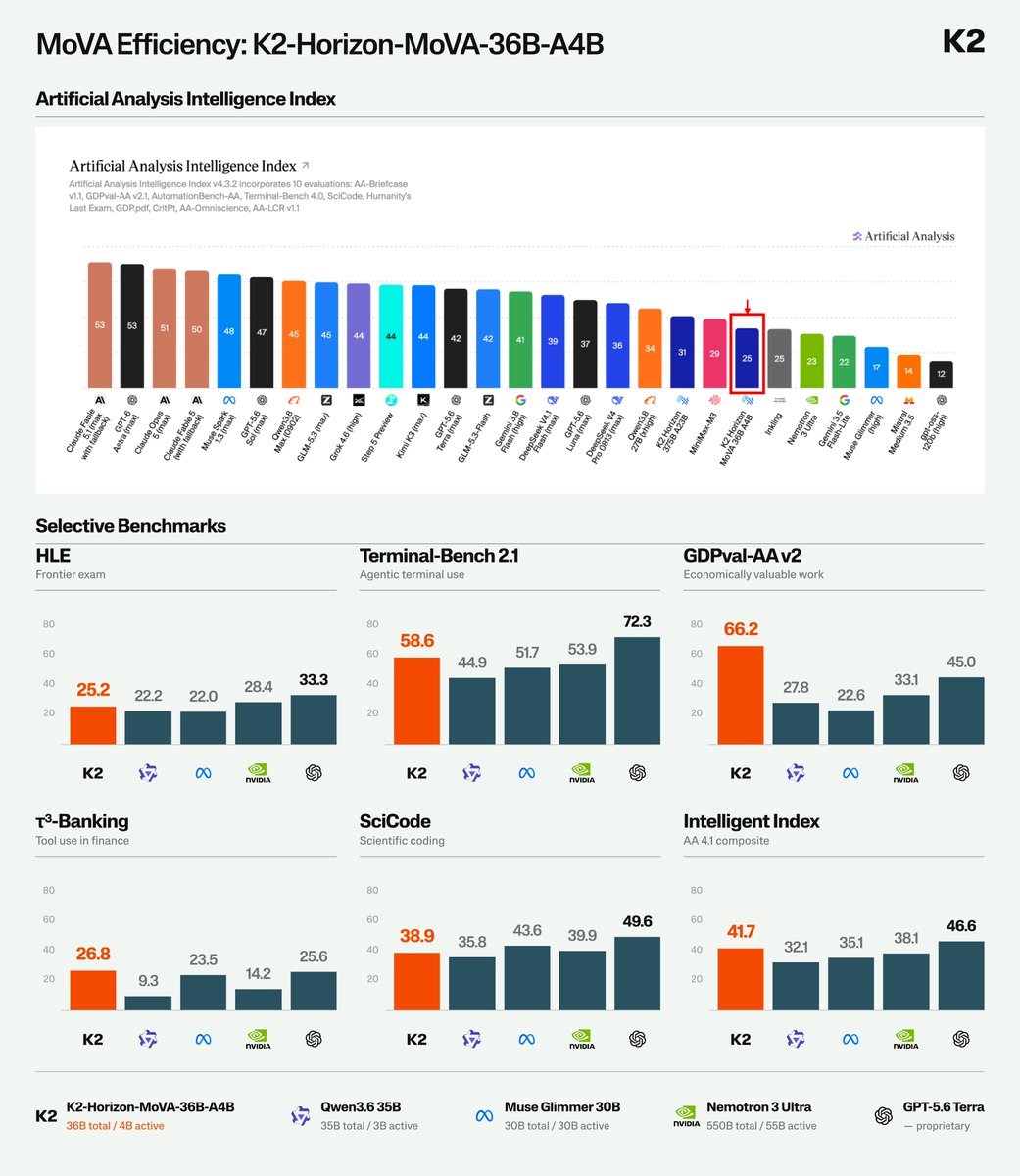
36B total parameters, ~4B active per token, and a score of 25 on the Artificial Analysis Intelligence Index. The interesting part is how much capability K2-Horizon-36B-A4B gets from a relatively small active parameter count. 17.1K views · 17 likes · 4 reposts · 5 replies Open on X →
AI video creation shouldn’t require learning complicated workflows. I tested @Pexoai_offical by creating a SaaS launch video for Linear. I shared the product URL, explained the direction in natural language, reviewed the first scene, gave feedback, and kept refining it through
1:26
40.2K views · 144 likes · 113 reposts · 144 replies Open on X →
K2-Horizon-36B-A4B scores 25 on the Artificial Analysis Intelligence Index, matching models with over 20× the total parameters while using 4B active parameters per token. These capabilities come from our new architecture MoVA (Mixture-of-Value Attention), which incorporates http
77.5K views · 366 likes · 82 reposts · 43 replies Open on X →
国区 iPhone 没有 Apple Intelligence / Siri AI?那就自己接一个。 我用 iOS 快捷指令 + OpenRouter,把 Ling 3.0 Flash VL 接进了 iPhone。 现在直接拍一张图,就可以交给视觉模型识别、理解并返回结果。视频里随手拍了一页 NVIDIA 的新闻稿,几秒后就能得到中文摘要、关键信息、风险点和建议。 https://t.co/7UJLWx4PlZ
0:55
9.3K views · 65 likes · 49 reposts · 79 replies Open on X →
There's a nice symmetry here: agents have their own internal perspective, while the environment maintains a state that exists beyond any single agent. 669 views · 5 likes · 0 reposts · 1 replies Open on X →
@techxutkarsh 日本からですがXの翻訳機能のお陰であなたの助言を受け取ることが出来ました、ありがとう! 132K views · 842 likes · 1 reposts · 0 replies Open on X →
5. Move Sensitive Emails Turning off Gmail's smart features helps, but for truly private emails, consider using a separate service. For medical, legal, or financial emails, use a free Proton Mail account. It offers end-to-end encryption and doesn't use AI to scan your emails. 363.7K views · 2K likes · 451 reposts · 41 replies Open on X →
3. Your Phone The settings don't always sync between devices, so check the Gmail app separately. Gmail app → Menu (☰) → Settings → Select your account → Turn off "Smart features and personalization" → Confirm. 590.5K views · 2.2K likes · 510 reposts · 16 replies Open on X →
4. Delete Gemini History If you've used Gemini before, your chats may be saved, and some could be reviewed by humans. Go to https://t.co/mCvRI6RrOe → Turn off Gemini Apps Activity → Delete Activity → All Time. This removes your past Gemini chat history and stops future 468.3K views · 1.6K likes · 403 reposts · 6 replies Open on X →
1. The Main Switch This is the main setting Google shows you, but it's not the only one. Gmail (Desktop): ⚙️ Settings → See all settings → Smart features and personalization → Uncheck "Turn on smart features in Gmail, Chat, and Meet" → Save Changes. 737.6K views · 4.3K likes · 943 reposts · 22 replies Open on X →
2. The Hidden Switch Turning off the first setting isn't enough. Most people stop there. On the same settings page: Google Workspace smart features → Manage Workspace smart feature settings → Turn off both checkboxes → Save. Both settings need to be turned off. 682.5K views · 3K likes · 694 reposts · 11 replies Open on X →
Google automatically turned on AI features in Gmail, Chat, and Meet for many users in late 2025. These features can read your emails, messages, and attachments to create summaries and suggestions. Google says your emails don't train Gemini, but some users say they never clearly 728.4K views · 2.3K likes · 589 reposts · 14 replies Open on X →
If you have a Gmail account, you need to read this. Google's AI now scans your emails and attachments, bank statements, tax files, medical letters, all of it. It turned on by default, and there's a class-action lawsuit over how. Here are 5 moves to shut it off, the switch is 8.9M views · 45.7K likes · 14.5K reposts · 366 replies Open on X →

เทียบกับบัญชีขนาดเดียวกัน

7 โพสต์จาก 90 วันที่ผ่านมา เทียบกับช่วง 10K–100K ผู้ติดตาม แสดงในวงกว้าง แต่มีผู้ชมตอบสนองน้อย.

ยอดดูมัธยฐาน9 272บัญชีนี้924ค่ามัธยฐานของ 10K–100K
การเข้าถึง, %46.38%บัญชีนี้3.62%ค่ามัธยฐานของ 10K–100K
การมีส่วนร่วม, %0.90%บัญชีนี้1.52%ค่ามัธยฐานของ 10K–100K
ตัวชี้วัดบัญชีนี้ค่ามัธยฐานของ 10K–100Kอัตราส่วน
ยอดดูมัธยฐานต่อโพสต์9 27292410.0×
การเข้าถึง (ยอดดู ÷ ผู้ติดตาม)46.38%3.62%12.8×
อัตราการมีส่วนร่วม0.90%1.52%0.59×

บัญชีอื่นในช่วงนี้ →   เปรียบเทียบกับบัญชีอื่น →   ค่าอ้างอิงเหล่านี้คำนวณอย่างไร →

Growth & engagement

How the posts we collected actually performed: views and reaction rate post by post, what the audience did with them, and where the follower count goes.

Views per post

728.4K12 Jun
682.5K
737.6K
468.3K
590.5K
363.7K
132K
66919 Sep
9.3K21 Sep
77.5K
40.2K
17.1K
231
261

Last 14 collected posts, oldest on the left. The scale is logarithmic: one post can outrun the rest a hundred times over.

Engagement rate per post

0.40%12 Jun
0.54%
0.71%
0.42%
0.46%
0.68%
0.64%
0.90%19 Sep
2.36%21 Sep
0.76%
1.23%
0.15%
0.87%
1.15%

Reactions — likes, reposts, replies and quotes — divided by views. Median for 10K–100K accounts is 1.52%.

What the audience does

Likes32.1%62 444 in total
Reposts9.4%18 330 in total
Replies0.4%748 in total
Quotes0.4%774 in total
Bookmarks57.7%112 427 in total

Share of every reaction we collected for this account. Replies mean argument, reposts mean endorsement, bookmarks mean the post was worth keeping.

The follower curve appears once this account has two daily snapshots — we take one a day, and this one is on its first.

บัญชีที่คล้ายกัน